Overview
Unreal Engine Editor plugin for permanent pivot baking and pivot-based actor grouping.
Table of Contents
- Overview
- Quick Start
- Key Features
- Open the Tool
- User Interface
- Pivot Baker
- Skeletal Mesh Baking Details
- Instance Compensation
- Pivot Groups
- Troubleshooting
- Disclaimer
Overview
Universal Pivot Baker lets you bake a new pivot into mesh assets directly in Unreal Editor. It rewrites mesh data so pivot changes are permanent, consistent, and do not rely on actor-only pivot offsets.
Note: Pivot baking edits asset data. Use source control or Duplicate Asset mode.
Quick Start
- Enable the plugin in Edit > Plugins and restart the editor.

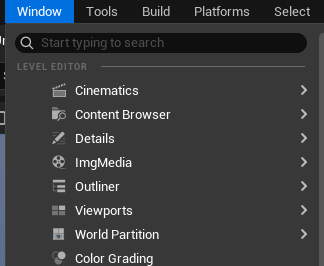
- Open Window > Universal Pivot Baker.

- Select one or more actors in the level (Static Mesh or Skeletal Mesh).
- Choose a preset or set an XYZ offset.
- Click Bake Selected (or use the Group tab to create a group pivot).
Key Features
- Permanent pivot baking into Static Mesh assets.
- Permanent pivot baking into Skeletal Mesh assets (with root track compensation for compatible animations).
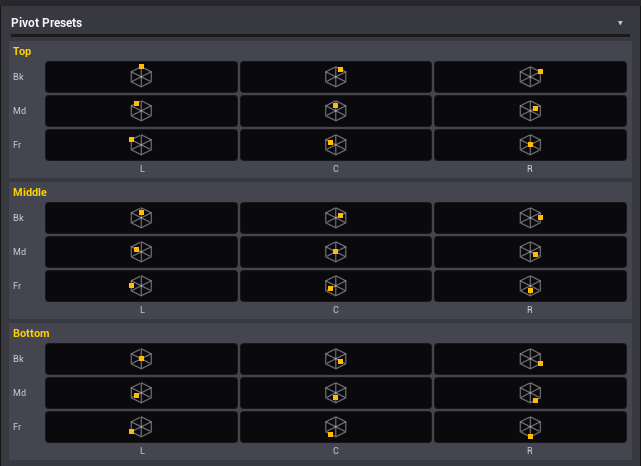
- 27 pivot presets (3x3x3) plus manual offset.
- Interactive pivot preview helper in the level viewport and embedded 3D preview panel.
- Batch baking support and Duplicate Asset workflow.
- Automatic instance compensation in the current editor world after baking.
- Pivot Groups tool to rotate multiple actors around a custom pivot.
Open the Tool
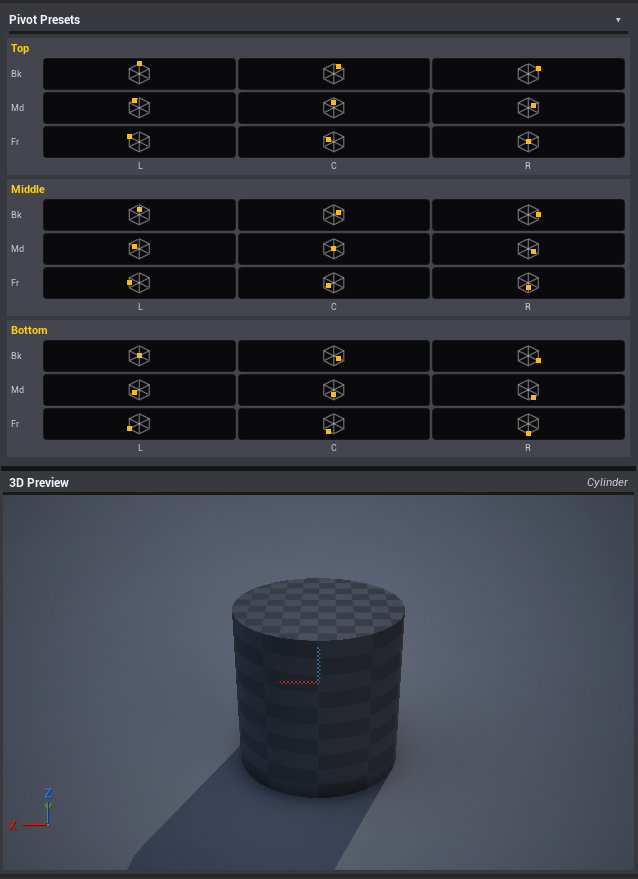
Open the panel from Window > Universal Pivot Baker.
User Interface
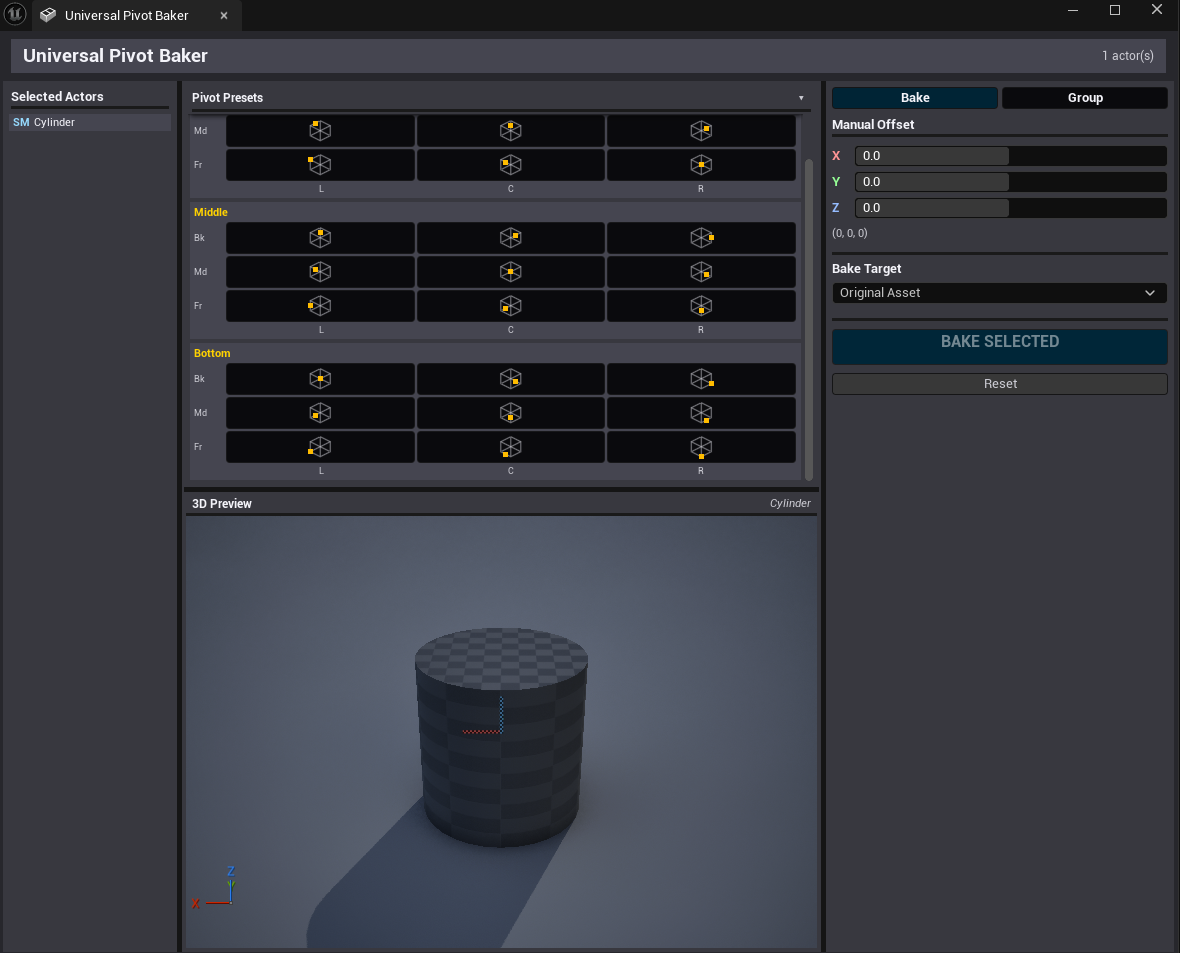
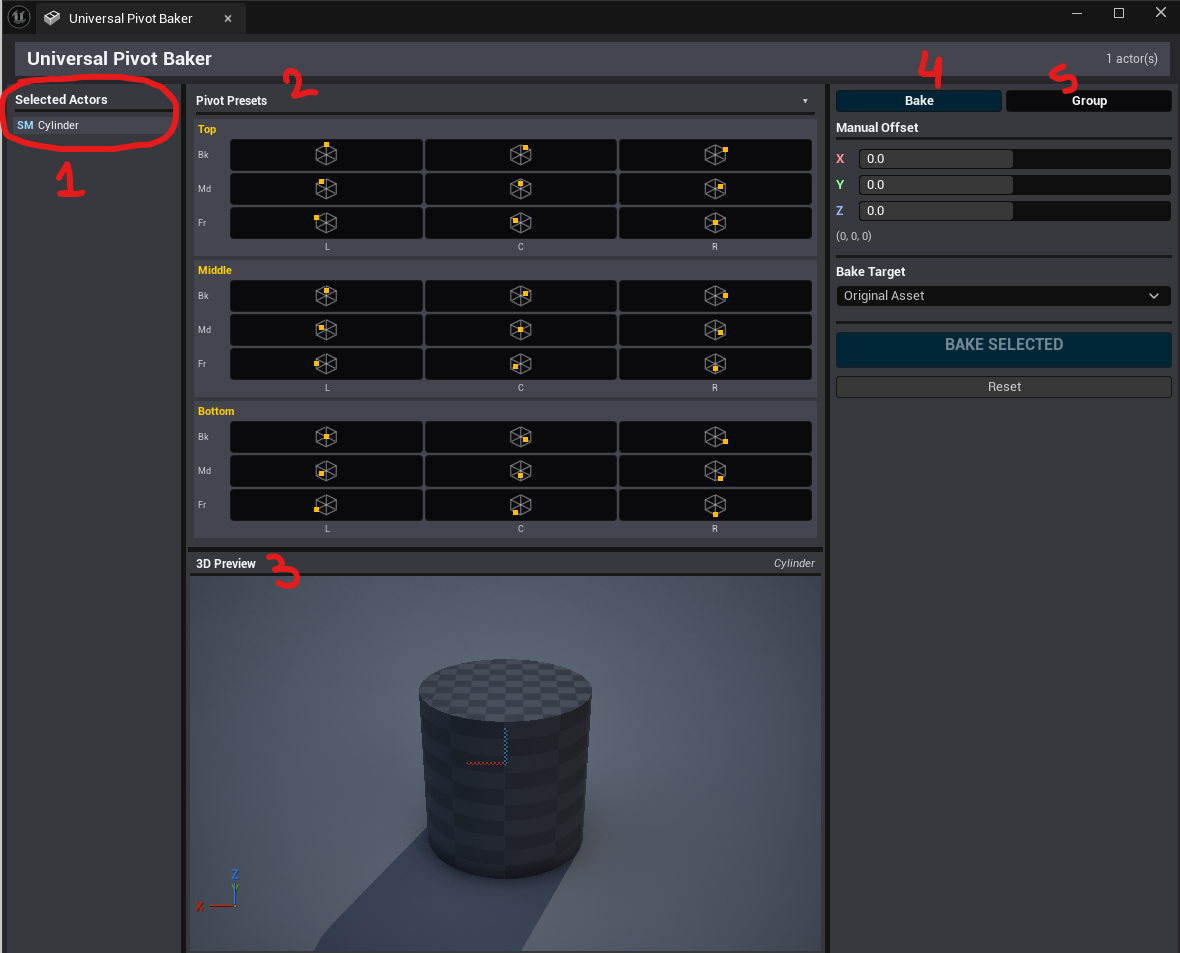
The window is split into three areas:
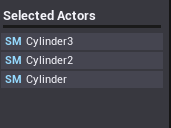
- Selected Actors(*1): shows current selection filtered to Static Mesh (SM) and Skeletal Mesh (SK) actors.
- Presets(*2) and Preview(*3): 27 preset buttons plus an embedded 3D preview viewport.
- Tabs: Bake (*4) and Group workflows (*5)
Pivot Baker
Selection
Select one or more actors that contain Static Mesh Components or Skeletal Mesh Components. The tool operates on the referenced mesh assets.
Define the Pivot
You can define the pivot using presets, manual offset with the interactive preview helper.
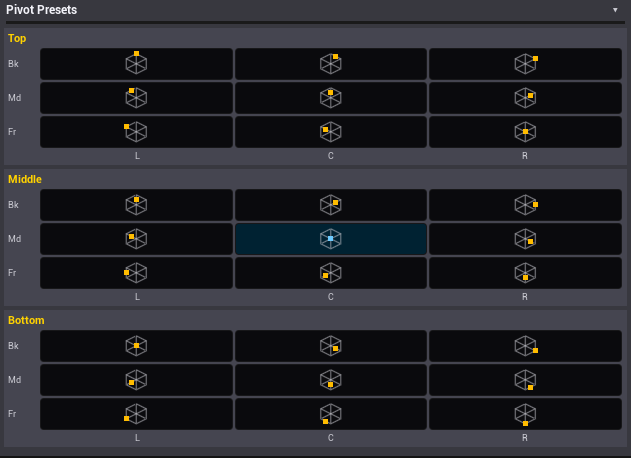
Pivot Presets (27)
Presets are arranged as a 3x3x3 cube based on selection bounds: Bottom, Middle, Top layers. Each preset targets a bounds corner, edge, face center, or the bounds center.
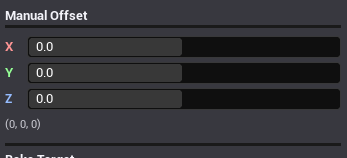
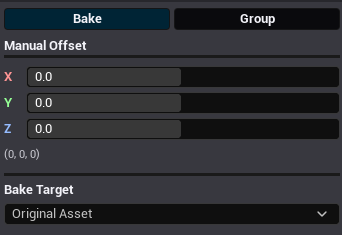
Manual Offset (XYZ)
Set an XYZ offset in mesh local space. Offsets are applied as a baked translation in the asset data.
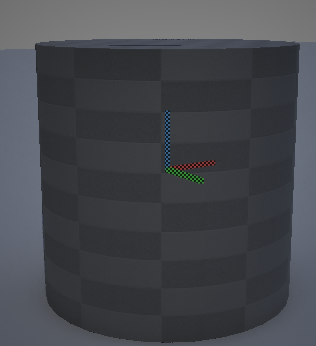
Interactive Pivot Preview
When you adjust the offset, the tool can spawn a small preview indicator in the current level. Use it to visually place the pivot. The editor pivot is also updated so you can validate rotation behavior before baking.
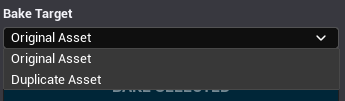
Bake Target
Choose how the baked pivot is applied:
- Original Asset: modifies the asset in place.
- Duplicate Asset: creates a new asset (suffix _PivotBaked) and assigns it to the selected components.
Bake
Click Bake Selected. After baking, the tool compensates instances in the current editor world so placed actors do not visually jump.
Skeletal Mesh Baking Details
Skeletal meshes require extra steps due to skinning and animation. The tool offsets mesh vertices, patches compatible animations, rebuilds the mesh, then corrects the reference pose root translation.
Important: Baking Skeletal Meshes can modify AnimSequence assets that use the same skeleton and contain a root track. Save before baking.
Process summary:
- Vertices are offset per LOD using MeshDescription when available. If MeshDescription is not available, the tool falls back to adjusting imported soft vertices.
- All AnimSequence assets in the project are scanned. Sequences that use the same USkeleton and contain the root bone track are patched by offsetting root translation keys.
- The mesh is rebuilt, then the skeletal mesh reference pose root bone translation is adjusted after Build to prevent double transforms.
- Inverse reference matrices are recomputed to keep skinning consistent.
Shared skeleton note:
- Shared skeleton detection is based on currently loaded skeletal meshes. If your skeleton is shared broadly, Duplicate Asset mode is recommended.
Instance Compensation
After baking, the tool compensates instances in the current editor world so placed actors do not appear to move. Compensation accounts for component rotation and scale when computing the world delta.
Pivot Groups
Pivot Groups lets you create an editable group pivot for multiple actors. A group is represented by an empty root actor placed at the pivot, with member actors attached to it while keeping their world transforms.
How Groups Are Represented
- A group root is an empty actor placed at the computed pivot world location.
- The root actor is tagged PivotBakerGroup.
- The root and its members are placed in the World Outliner folder PivotBaker/.
- Members are attached to the root using KeepWorldTransform.
- The root label is _Pivot.
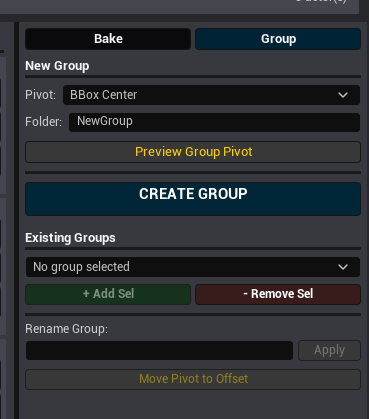
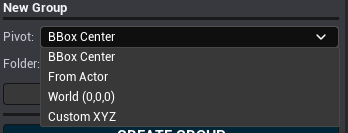
Pivot Sources
- BBox Center: center of combined component bounds for the selection.
- From Actor: uses the location of a chosen source actor (must be part of the selection).
- World (0,0,0): uses world origin.
- Custom XYZ: uses a custom world-space pivot position.
Preview Group Pivot
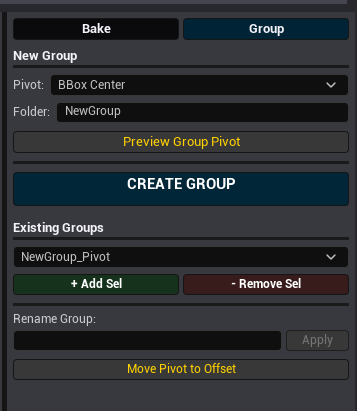
Preview Group Pivot computes the pivot using the selected source and spawns a preview indicator at that location. It also sets the editor pivot to the same position so you can test rotations before creating the group.
Create Group
- Select one or more actors.
- Choose a pivot source and set a folder name.
- Click CREATE GROUP.
The tool creates the group root actor, attaches selected actors, and organizes them into the group folder. Operations are undoable.
Existing Groups
The Existing Groups section lists all group roots found in the current editor world (actors tagged PivotBakerGroup).
Add Selection to Group
Use + Add Sel to attach the current selection to the selected group root. Actors are attached with KeepWorldTransform and moved into the group folder.
Remove Selection from Group
Use - Remove Sel to detach selected actors from their group root (if their parent is a group root). Detached actors keep their world transforms and are moved up one folder level.
Rename Group
Rename Group updates the group root label and changes the folder path for the root and all attached members to PivotBaker/.
Move Pivot to Offset
Move Pivot to Offset repositions the group root while preserving member world transforms. The new pivot is computed as FirstSelectedMeshWorldPos + CurrentOffset. CurrentOffset is the same offset used on the Pivot Baker side.
Group Usage Tips
- Rotate the group root actor to rotate the entire set around the group pivot.
- Use Preview Group Pivot to validate pivot placement before creating a group.
- Groups are intended for level editing workflows and are stored using tags and folders for easy organization.
Troubleshooting
- Bake button is disabled: Make sure you have a valid selection and the offset is not zero.
- Mesh did not appear to move after bake: Placed instances may be compensated. Place a new instance to confirm the pivot change.
- Skeletal animations were not updated: Only AnimSequence assets using the same skeleton and containing a root bone track are patched.
- Group does not appear in Existing Groups: Only group roots tagged PivotBakerGroup are listed. Verify the tag and that you are in the correct world.
Disclaimer
- Legal Notice and Disclaimer
This Unreal Engine Editor plugin performs editor-time operations that may modify, rebuild, duplicate, or re-save assets and related project data. By installing or using the plugin, you acknowledge that asset editing carries inherent risk and you accept full responsibility for any results, including unintended changes.
- No Warranty
The plugin is provided "AS IS" and "AS AVAILABLE" without any warranty of any kind. The author disclaims all warranties, express or implied, including implied warranties of merchantability, fitness for a particular purpose, title, and non-infringement.
- Limitation of Liability
To the fullest extent permitted by law, the author and publisher shall not be liable for any claim, damages, or other liability, whether in an action of contract, tort, or otherwise, arising from, out of, or in connection with the plugin or the use of the plugin. This includes, without limitation, damages for loss of data, loss of profits, loss of goodwill, project downtime, asset corruption, or any costs of recovery or rework.
- User Obligations
You agree to:
- Maintain backups and/or source control before use.
- Test on a copy of the project or duplicated assets first.
- Verify results before committing changes.
- Assume all risks related to modifying assets and project data.
- Indemnification
You agree to indemnify and hold harmless the author and publisher from and against any claims, damages, liabilities, losses, and expenses arising from your use of the plugin, except where prohibited by law.